
Introduction
For years, automation has often been presented with one simple promise:
“Let technology do the work so people don’t have to.”
But that way of thinking is incomplete.
The most valuable use of automation isn’t necessarily to eliminate people or make human work disappear. It is to remove repetitive, unnecessary and time-consuming tasks so people can spend more of their time doing work that requires judgment, creativity, relationships, problem-solving and strategy.
This distinction becomes even more important with the rise of AI, intelligent automation and AI agents.
A business can use technology to process invoices, organise data, answer routine customer questions, schedule meetings, analyse documents and generate reports—while still keeping humans responsible for decisions, relationships and exceptions.
The goal should therefore not simply be:
“How much human work can we eliminate?”
A better question is:
“How can we redesign work so technology handles what it does best and people focus on what they do best?”
That is the idea behind augmenting work rather than simply eliminating it.
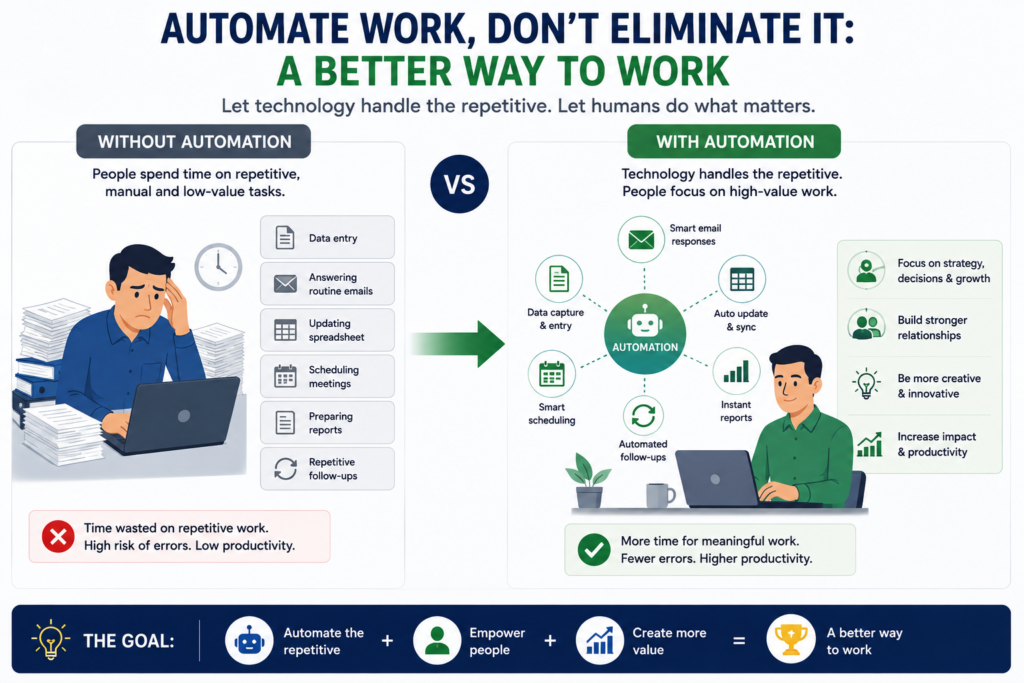
1. What Does “Automate Work” Actually Mean?
Automation means using technology to perform a task or series of tasks with reduced human involvement.
For example, imagine a business receives 500 customer enquiries every week.
Without automation:
Customer enquiry → Employee reads it → Employee categorises it → Employee responds → Employee updates CRM → Employee schedules follow-up
With automation:
Customer enquiry → AI categorises it → Automated response → CRM updated → Follow-up scheduled
The process still exists.
The difference is that technology handles much of the repetitive execution.
The employee can focus on enquiries that require:
- Judgment
- Negotiation
- Empathy
- Problem-solving
- Technical expertise
- Human interaction
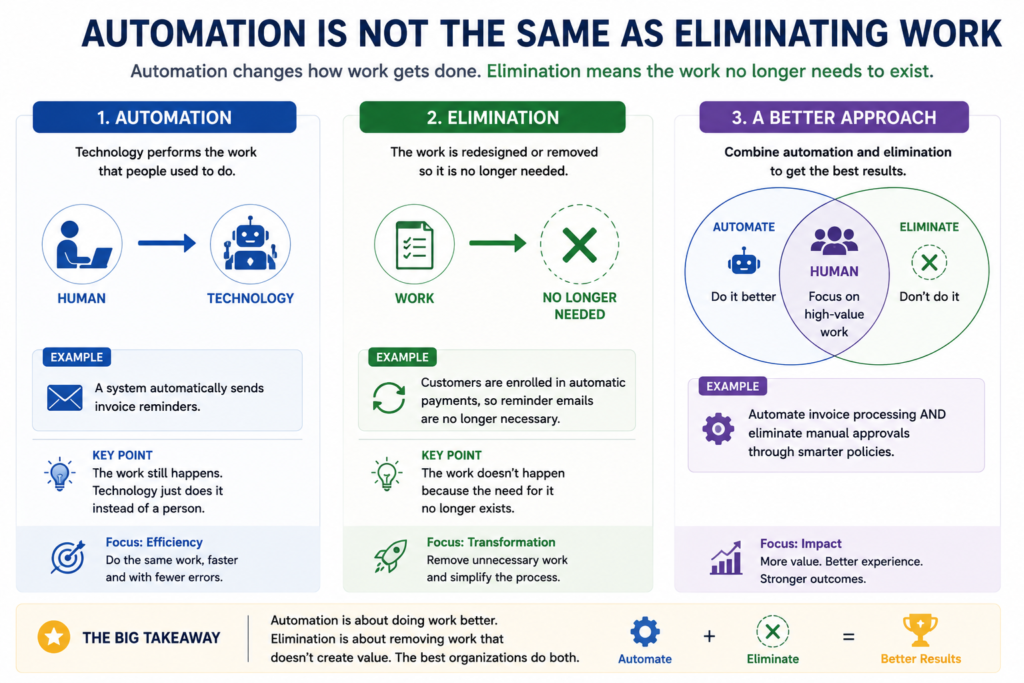
2. Automation Is Not the Same as Eliminating Work
This distinction is the foundation of the entire concept.
Automation
Technology performs the work.
Elimination
The work itself is no longer necessary.
Augmentation
Technology helps a human perform the work better.
For example, consider a sales representative.
Before automation
The salesperson spends hours:
- Finding prospects
- Entering information
- Sending repetitive emails
- Updating CRM records
- Creating reports
- Scheduling meetings
After automation
Technology handles:
- Lead capture
- Data entry
- Lead scoring
- Routine follow-ups
- Meeting scheduling
- Reporting
The salesperson spends more time:
- Speaking with prospects
- Understanding their problems
- Building relationships
- Negotiating
- Closing deals
The salesperson hasn’t necessarily become less important.
The nature of their work has improved.
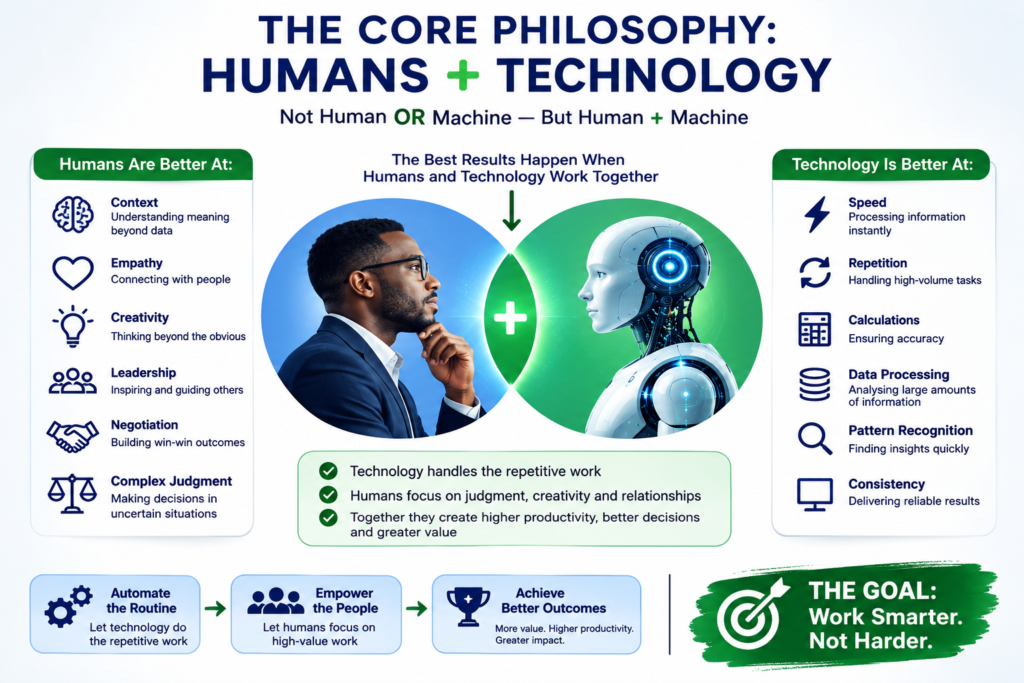
3. The Core Philosophy: Humans + Technology
The strongest automation strategy is not:
Human OR machine
It is:
Human + machine
Machines are generally excellent at:
- Speed
- Repetition
- Calculations
- Data processing
- Pattern recognition
- Monitoring
- Consistency
- Large-scale information processing
Humans are generally better suited to:
- Context
- Empathy
- Creativity
- Leadership
- Negotiation
- Complex judgment
- Ethical decisions
- Relationship building
- Strategic thinking
- Handling unusual situations
The opportunity is to combine these strengths.
4. Why Businesses Shouldn’t Automatically Try to Eliminate Human Work
There is a dangerous assumption that:
Less human involvement = better business.
Not necessarily.
Removing humans from a process can sometimes reduce cost.
But it can also introduce:
- Poor customer experiences
- Unnoticed errors
- Weak decision-making
- Lack of accountability
- Loss of institutional knowledge
- Inflexibility
- Difficulty handling unusual situations
A completely automated process may work perfectly under normal circumstances and fail badly when something unexpected happens.
That’s why good automation systems need to be designed around exceptions.
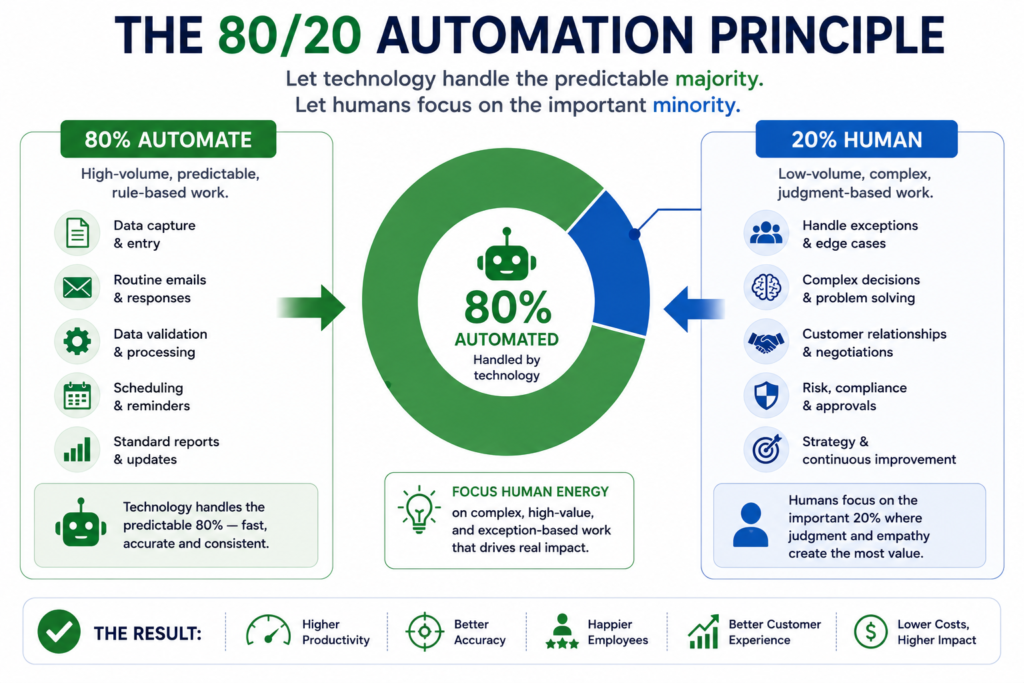
5. The 80/20 Automation Principle
A useful way of thinking about automation is:
Let technology handle the predictable majority while humans handle the important minority.
Imagine a business receives 10,000 requests.
Suppose:
- 8,500 are routine.
- 1,500 are complex.
Instead of having employees manually process all 10,000:
Automation handles the 8,500 routine requests.
Humans handle the 1,500 exceptions.
This can produce enormous productivity gains without removing humans from the overall process.
The objective isn’t necessarily to automate 100%.
Sometimes automating 80–90% while intelligently escalating the rest is the better solution.
6. The Exception Principle
This is one of the most important ideas in intelligent automation.
A system should be designed to distinguish between:
Normal situations
and
Exceptional situations
For example:
If invoice amount < $5,000 and supplier is approved → process automatically.
But:
If invoice > $5,000 → send for human review.
Or:
If customer question matches an approved FAQ → AI responds.
But:
If customer threatens legal action → escalate to human.
This creates a human escalation layer.
The technology handles predictable work.
Humans remain available when the situation becomes unusual, sensitive or high-risk.
7. Automation Should Remove Friction, Not Humanity
This is particularly important in customer-facing businesses.
Consider a hotel.
Automation can handle:
- Booking confirmations
- Payment reminders
- Check-in instructions
- Frequently asked questions
- Reservation updates
But customers may still want a human when:
- Something goes wrong
- They have a special request
- There is a complaint
- They need reassurance
- They are dealing with an unusual situation
The objective isn’t to eliminate human interaction.
It is to eliminate unnecessary waiting and repetitive administration.
8. The Difference Between Low-Value and High-Value Work
One of the best ways to decide what to automate is to classify work according to value.
Low-value repetitive work
Examples:
- Copying information
- Formatting spreadsheets
- Sending routine emails
- Updating databases
- Scheduling
- Basic data entry
- Generating repetitive reports
These are strong automation candidates.
Higher-value work
Examples:
- Strategy
- Negotiation
- Leadership
- Product development
- Customer relationships
- Complex analysis
- Creative problem-solving
These may benefit more from AI assistance than complete automation.
9. The Goal Should Be to Eliminate Tasks, Not Automatically Eliminate People
This is an important distinction for managers.
A job is usually not one task.
A job is a collection of tasks.
Consider an accountant.
Their job might include:
- Data entry
- Invoice processing
- Reconciliation
- Reporting
- Financial analysis
- Compliance
- Client communication
- Strategic advice
Automation might remove:
Data entry + invoice processing + basic reconciliation
But that doesn’t necessarily eliminate:
Analysis + compliance + communication + strategy
Instead, the accountant’s role can shift toward higher-value activities.
10. A Job Is Really a Bundle of Tasks
This is one of the most useful ways to understand the future of work.
Think of a job as:
Job = Task 1 + Task 2 + Task 3 + Task 4 + Task 5 + Task 6
Technology may automate:
Task 1 + Task 3 + Task 5
while humans continue handling:
Task 2 + Task 4 + Task 6
Therefore, the first effect of automation is often task transformation, not complete job elimination.
Over time, however, if technology can perform nearly all economically valuable tasks in a role, the role itself may decline.
So it is important to be realistic:
Automation can sometimes eliminate jobs. But the strategic goal of a business does not have to be job elimination.
11. What Makes a Task Suitable for Automation?
A task is generally a strong candidate when it is:
Repetitive
It happens frequently.
Predictable
The same rules apply repeatedly.
Structured
Inputs and outputs are clearly defined.
High-volume
Employees spend significant time doing it.
Time-consuming
It consumes valuable employee hours.
Error-prone
Humans frequently make mistakes performing it.
Digitally accessible
The required information exists in digital systems.
Low-risk
Errors don’t create unacceptable consequences.
12. What Should Usually Remain Human?
Some work requires human involvement because of its complexity or consequences.
Examples include:
Strategic decisions
Where the business should invest.
Complex negotiations
Where relationships and persuasion matter.
Sensitive customer situations
Complaints, disputes and emotionally difficult situations.
High-risk decisions
Where errors could cause significant financial, legal or reputational consequences.
Ethical decisions
Where there isn’t a simple mathematical answer.
Creative direction
Where originality and human understanding matter.
Leadership
Motivating people and making organisational decisions.
13. Automation vs AI-Assisted Work
Not everything needs to be fully automated.
Sometimes the best solution is AI assistance.
For example:
Fully manual
Employee researches 20 documents.
AI-assisted
AI summarises the documents.
Employee reviews the summaries.
Fully automated
AI reads documents, extracts information and automatically updates the system.
The right level depends on:
- Risk
- Complexity
- Accuracy requirements
- Cost
- Frequency
- Human oversight requirements
14. Three Useful Levels of AI Automation
Level 1 — AI Assistant
AI helps the employee.
Example:
“Summarise this customer conversation.”
The human decides what to do.
Level 2 — AI Co-worker
AI performs part of the workflow.
Example:
AI reads the enquiry, categorises it and drafts the response.
Human approves it.
Level 3 — AI Agent
AI performs a multi-step workflow toward a defined objective.
Example:
Identify new leads → research them → score them → personalise outreach → update CRM → schedule follow-up → escalate interested leads.
Humans supervise the system and handle exceptions.
15. Automation Can Actually Make Employees More Valuable
This may seem counterintuitive.
If technology removes repetitive tasks, employees may have more time to develop skills that are difficult to automate.
For example:
Before:
Employee spends 60% of time on administration.
After:
Employee spends 15% on administration.
The remaining time can be used for:
- Customer relationships
- Upselling
- Strategy
- Research
- Innovation
- Problem-solving
The employee’s output per hour can increase dramatically.
This is productivity through augmentation.
16. The Hidden Cost of Not Automating
Businesses often think automation costs money.
It does.
But manual work also has a cost.
Consider an employee earning $2,000 per month.
If 30% of their time is spent on repetitive administrative tasks, the business is effectively spending:
$600/month
on that category of work for that employee.
Across 20 employees:
$12,000/month
And that’s before considering:
- Errors
- Delays
- Rework
- Customer dissatisfaction
- Missed opportunities
- Employee burnout
Automation analysis should therefore consider the cost of doing nothing.
17. Automation Can Increase the Quality of Work
Automation isn’t only about saving money.
It can improve consistency.
For example, a human might forget to follow up with a lead.
An automated workflow can ensure:
Every qualified lead receives a follow-up.
Similarly:
A human may occasionally enter incorrect data.
An automated system can apply validation rules consistently.
Automation can therefore improve:
- Consistency
- Accuracy
- Response times
- Compliance
- Visibility
- Reporting
18. Automation Doesn’t Remove the Need for Management
A common mistake is assuming:
“Once we automate it, we’re finished.”
Not necessarily.
Automated systems need:
- Monitoring
- Maintenance
- Testing
- Security
- Performance measurement
- Error handling
- Updates
- Human oversight
AI systems additionally need attention to:
- Incorrect outputs
- Hallucinations
- Bias
- Data quality
- Prompt/instruction quality
- Access permissions
- Privacy
- Security
Automation creates a new operational responsibility.
19. Automating a Bad Process Is Still a Bad Idea
Imagine a company has a terrible 15-step approval process.
Instead of redesigning it, the company builds automation around all 15 steps.
Now it has:
A very efficient bad process.
The better approach is:
Step 1
Map the process.
Step 2
Question every step.
Step 3
Remove unnecessary steps.
Step 4
Simplify the remaining process.
Step 5
Automate what is predictable.
Step 6
Add human escalation where necessary.
This is known as process optimisation before automation.
20. Don’t Automate Before You Understand the Process
Before implementing automation, document:
Trigger → Steps → Decision points → Outputs → Exceptions
For example:
New lead arrives
↓
Capture information
↓
Check lead quality
↓
Assign salesperson
↓
Send acknowledgement
↓
Schedule follow-up
↓
Update CRM
↓
Monitor response
Now ask:
- Which step is repetitive?
- Which step requires judgment?
- Which step causes delays?
- Which step produces errors?
- Which step can disappear?
- Which step can be automated?
This creates a much stronger automation strategy.
21. The “Remove, Simplify, Automate” Framework
A particularly useful framework is:
1. Remove
Ask:
Does this task need to exist?
If not, eliminate it.
2. Simplify
Ask:
Can we reduce the number of steps?
If yes, redesign the process.
3. Automate
Ask:
Which remaining steps can technology perform?
This is much better than starting with:
“What software should we buy?”
22. Automation Should Start With the Business Problem
Bad approach:
“We need AI.”
Better approach:
“Our salespeople spend 15 hours per week updating CRM records.”
Even better:
“Our salespeople spend 15 hours per week on administrative tasks instead of selling.”
Now you can determine whether automation is actually appropriate.
The technology is the solution.
The business problem is the starting point.
23. How to Measure Whether Automation Is Working
Don’t measure automation simply by asking:
“Did we install the software?”
Measure outcomes.
Important metrics include:
Time saved
How many hours are removed from repetitive work?
Processing speed
How much faster is the process?
Error rate
Are mistakes decreasing?
Cost per transaction
How much does each transaction now cost?
Throughput
How much more work can the business handle?
Customer experience
Are customers receiving faster or better service?
Employee experience
Are employees spending more time on meaningful work?
Revenue impact
Does automation contribute to more sales or retention?
Return on investment
Does the value generated justify the technology cost?
24. Automation ROI
A simple way to think about automation ROI is:
Automation value = labour saved + errors reduced + revenue opportunity + time recovered − automation cost
The exact calculation will vary between businesses.
For example, automation might:
- Save $5,000/month in employee time.
- Reduce $1,000/month in errors.
- Generate an additional $3,000/month in sales capacity.
- Cost $2,000/month to operate.
The economic case becomes much clearer.
But businesses should also consider implementation and maintenance costs, not just software subscription prices.
25. What Happens to the Time Automation Saves?
This is one of the most important questions in your entire topic.
Suppose automation saves employees:
10 hours per week.
What happens to those 10 hours?
If employees simply receive 10 additional hours of work, automation may not meaningfully improve their experience.
A better approach is to deliberately redirect the time toward:
- Sales
- Customer service
- Product development
- Research
- Innovation
- Training
- Strategic work
Automation creates capacity.
Management has to decide where that capacity goes.
26. Automation Can Create “Capacity,” Not Just Savings
This is a powerful business concept.
Imagine a company can process:
1,000 orders/month
with its current workforce.
Automation increases capacity to:
5,000 orders/month
without increasing headcount proportionally.
The company hasn’t simply saved money.
It has created scalable operational capacity.
This can allow businesses to:
- Serve more customers
- Enter new markets
- Increase revenue
- Respond faster
- Grow without proportionally increasing operational costs
27. The Difference Between Cost Cutting and Productivity
Automation can be used for two very different purposes.
Cost-cutting mindset
“How many employees can we remove?”
Productivity mindset
“How much more valuable work can our existing people accomplish?”
The second approach can create a very different organisational culture.
Instead of seeing automation as a threat, employees can see it as:
A tool that removes the least enjoyable parts of their jobs.
28. Automation and Employee Skills
Automation changes the skills businesses need.
As repetitive work declines, demand can increase for skills such as:
- Critical thinking
- AI literacy
- Data analysis
- Communication
- Problem-solving
- Strategy
- System supervision
- Process design
- Customer relationship management
Employees increasingly need to understand not only how to perform work, but also how to work effectively with technology.
29. The Rise of the “Automation Manager”
As businesses adopt more AI systems, someone needs to understand:
- Which processes should be automated
- Which tools should be connected
- How workflows should operate
- Where humans remain involved
- How errors are handled
- How performance is measured
This creates a growing need for people who understand both:
Business processes + technology
The most effective automation isn’t created by technology experts alone.
It requires people who understand how the business actually operates.
30. Automation and Business Process Reengineering
Automation becomes especially powerful when combined with business process reengineering.
Instead of asking:
“How do we automate this existing process?”
Ask:
“If we were designing this process from scratch today, how would we build it?”
This can result in completely different workflows.
For example:
Old process
Customer → Form → Email → Employee → Spreadsheet → Manager → CRM
Redesigned process
Customer → Intelligent form → CRM → AI qualification → Automated workflow → Human only when needed
The second system isn’t simply automated.
It has been redesigned around technology.
31. Automation Should Be Designed Around Exceptions
A mature automation system asks:
“What happens when everything goes normally?”
But an excellent system also asks:
“What happens when something goes wrong?”
For every automated process, define:
Normal path
What happens automatically?
Exception path
When does the system stop?
Escalation path
Who receives the case?
Recovery path
How is the problem resolved?
Audit path
Can we determine what happened?
This is particularly important for AI-powered automation.
32. AI Makes Automation More Flexible—but Also More Risky
Traditional automation usually follows explicit rules.
AI can interpret information.
That’s powerful.
But interpretation creates uncertainty.
For example:
A traditional workflow can say:
If invoice amount > $10,000, send to manager.
An AI system might:
Read the invoice, determine whether it appears unusual and decide whether escalation is necessary.
The second approach can handle more complexity.
But it also requires stronger controls.
33. AI Automation Needs Guardrails
Businesses should consider:
- What is the AI allowed to do?
- What is it not allowed to do?
- What data can it access?
- When must it ask for human approval?
- What actions require two-person approval?
- How are decisions logged?
- How can errors be detected?
- How can access be revoked?
The more autonomy an AI system receives, the more important governance becomes.
34. Human-in-the-Loop Automation
A very practical model is:
AI → Human → AI
For example:
AI analyses a document.
↓
Human reviews the result.
↓
AI performs the next action.
This gives the business automation while preserving human oversight.
Another model is:
AI → Human only when necessary
This is useful when the majority of cases are predictable.
35. Automation Should Not Remove Accountability
Even if an AI system makes a decision, the business may still be responsible for the outcome.
Therefore:
Automation should change who performs the task, not necessarily who is accountable for the result.
This is especially important in areas such as:
- Finance
- Legal services
- Healthcare
- Security
- Hiring
- Customer disputes
- Compliance
- Trading
36. Automation in Trading
The principle also applies to traders.
A trader may spend hours:
- Monitoring markets
- Checking indicators
- Calculating position size
- Looking for setups
- Recording trades
- Analysing historical performance
Automation can handle many of these repetitive activities.
For example:
Market data → Strategy conditions → Risk calculation → Alert → Trade journal
AI can potentially assist with:
- Market summaries
- Pattern analysis
- Trading journal analysis
- Sentiment analysis
- Research
- Strategy development
But human oversight remains important, particularly for strategy design, risk management and unusual market conditions.
The goal isn’t necessarily to eliminate the trader.
It can be to remove the mechanical workload surrounding trading.
37. Automation in Small Businesses
Small businesses can benefit enormously because employees often perform many different roles.
For example, one person may handle:
- Sales
- Customer support
- Invoicing
- Scheduling
- Reporting
- Marketing
Automation can act as a digital support layer.
For example:
Lead arrives
→ CRM automatically updated
→ AI qualifies lead
→ Follow-up message sent
→ Meeting scheduled
→ Reminder sent
→ Customer information prepared for salesperson
One employee can therefore manage significantly more activity without being overwhelmed by administration.
38. Automation in Large Businesses
Large organisations have different challenges.
They often have:
- Thousands of employees
- Multiple departments
- Legacy systems
- Complex approvals
- Huge data volumes
- Duplicate processes
Automation can connect systems and reduce administrative friction.
But large-scale automation also requires:
- Governance
- Security
- Change management
- Integration architecture
- Employee training
- Monitoring
The technology becomes only one part of the transformation.
39. Common Automation Mistakes
Mistake 1: Automating everything
Not every task should be automated.
Mistake 2: Starting with software
Start with the business problem.
Mistake 3: Automating a broken process
Fix the process first.
Mistake 4: Ignoring employees
Employees understand processes that management may not see.
Mistake 5: Ignoring exceptions
The unusual cases can cause the biggest problems.
Mistake 6: No monitoring
Automation needs supervision.
Mistake 7: No measurable objective
Know what success looks like.
Mistake 8: Expecting immediate perfection
Automation systems often require testing and refinement.
Mistake 9: Giving AI too much authority too quickly
Start with controlled use cases and expand autonomy gradually.
Mistake 10: Measuring only cost savings
Consider quality, speed, revenue, employee experience and customer satisfaction.
40. A Better Automation Strategy
A strong automation project can follow this sequence:
Step 1 — Map the work
Document the existing process.
Step 2 — Identify friction
Find bottlenecks, repetitive work and errors.
Step 3 — Eliminate unnecessary steps
Ask what doesn’t need to exist.
Step 4 — Simplify
Reduce unnecessary complexity.
Step 5 — Automate predictable tasks
Use conventional automation where rules are clear.
Step 6 — Add AI where interpretation is required
Use AI for unstructured or language-heavy work.
Step 7 — Keep humans where judgment matters
Create human checkpoints.
Step 8 — Define exceptions
Determine when automation must stop.
Step 9 — Monitor
Track performance continuously.
Step 10 — Improve
Use the results to redesign the workflow.
41. A Practical Example: From Manual Work to Intelligent Work
Imagine a company receives 1,000 customer leads every month.
Old system
Employee receives lead.
↓
Reads email.
↓
Copies information into spreadsheet.
↓
Researches customer.
↓
Assigns salesperson.
↓
Sends email.
↓
Creates follow-up reminder.
↓
Updates CRM.
This could take several hours every day.
Redesigned system
Lead arrives.
↓
AI extracts information.
↓
CRM automatically creates record.
↓
AI scores lead.
↓
System assigns salesperson.
↓
AI prepares personalised message.
↓
Follow-up automatically scheduled.
↓
Salesperson receives complete customer profile.
↓
Salesperson focuses on the conversation.
The business hasn’t eliminated sales.
It has eliminated sales administration.
That is the core philosophy.
42. The New Definition of Productivity
Traditional productivity often asks:
“How much work can one employee complete?”
A modern approach asks:
“How much valuable output can a human + technology system produce?”
That is a much more powerful metric.
An employee equipped with:
- AI
- Automation
- Good data
- Integrated systems
- Clear processes
may be capable of producing significantly more than an employee relying entirely on manual processes.
43. The Future Isn’t About Doing More Work
This is an important philosophical point.
Automation shouldn’t simply give employees:
More tasks to complete.
It should give them:
More capacity to create value.
If automation saves five hours but management immediately fills those five hours with five additional administrative tasks, the organisation has missed the opportunity.
The real benefit comes when saved time is redirected toward activities that matter.
44. The Best Automation Is Often Invisible
Customers don’t necessarily need to know that automation is happening.
They simply experience:
- Faster responses
- Fewer mistakes
- Easier transactions
- Better personalisation
- Faster problem resolution
Similarly, employees don’t necessarily need to interact with the automation directly.
They may simply notice:
“I don’t have to do that anymore.”
That’s often a sign of successful automation.
45. The Ultimate Goal: Better Work
The title of this article says:
Automate work, don’t eliminate it: A better way to work.
The deeper meaning is not that businesses should never eliminate jobs or tasks.
It is that automation should be approached as work redesign rather than simply workforce reduction.
The question shouldn’t only be:
“What can technology replace?”
It should also be:
“What can technology remove from people’s workload?”
“What can technology help people do better?”
“What new opportunities become possible when repetitive work disappears?”
“Where is human judgment still most valuable?”
Those questions lead to a much more productive approach to AI adoption.
46. The Complete Framework
A useful framework for businesses is:
REMOVE
Eliminate unnecessary work.
↓
SIMPLIFY
Make necessary processes easier.
↓
AUTOMATE
Let technology handle repetitive work.
↓
AUGMENT
Use AI to make people more capable.
↓
ESCALATE
Send exceptions to humans.
↓
MEASURE
Track the results.
↓
IMPROVE
Continuously redesign the process.
This can become a powerful philosophy for an AI and automation company.
47. Key Takeaways
If readers remember only a few things, they should remember these:
1. Automation and elimination are not the same.
Automation changes who or what performs the work.
Elimination removes the need for the work.
2. Jobs are collections of tasks.
Automating individual tasks does not automatically mean eliminating the entire job.
3. Automate repetitive work first.
Start with high-volume, predictable, low-value activities.
4. Don’t automate broken processes.
Remove → Simplify → Automate.
5. Humans are still valuable.
Use people for judgment, strategy, relationships, creativity and exceptions.
6. AI can augment employees.
The most powerful model is often:
Human + AI + Automation.
7. Automation creates capacity.
The real question is what the business does with the time it saves.
8. Measure outcomes.
Track time, cost, quality, errors, revenue, customer experience and employee experience.
9. Don’t confuse automation with “set and forget.”
Automated systems require monitoring, maintenance and governance.
10. The goal is better work.
The ultimate objective isn’t simply to make humans do less.
It is to make humans spend less time on low-value work and more time creating meaningful value.
Final Conclusion
The future of work doesn’t have to be a battle between humans and machines.
It can be a partnership.
Machines can handle repetition.
AI can help process information, identify patterns and assist with complex workflows.
Automation can move information, trigger processes and execute routine actions.
Humans can provide judgment, creativity, leadership, empathy, relationships and accountability.
The businesses that benefit most from automation will not necessarily be the ones that automate the most.
They will be the ones that design work intelligently.
Don’t ask, “How can we eliminate this person’s work?”
Ask:
“How can we eliminate the unnecessary parts of this person’s work and give them better tools to do the parts that matter?”
That is the difference between automation as cost-cutting and automation as a strategy for building a better, more productive business.
Visit our store to explore our trading solutions