Introduction
AI automation is changing how businesses manage information, communicate with customers, and complete repetitive tasks. Instead of keeping your CRM, email, spreadsheets, support tools, and internal systems isolated, AI can help connect them into a coordinated workflow.
The result is simple: less manual work, fewer data gaps, faster responses, and more efficient operations.
What Is AI Automation?
AI automation combines artificial intelligence, software integrations, and automated workflows to perform tasks that previously required human intervention.
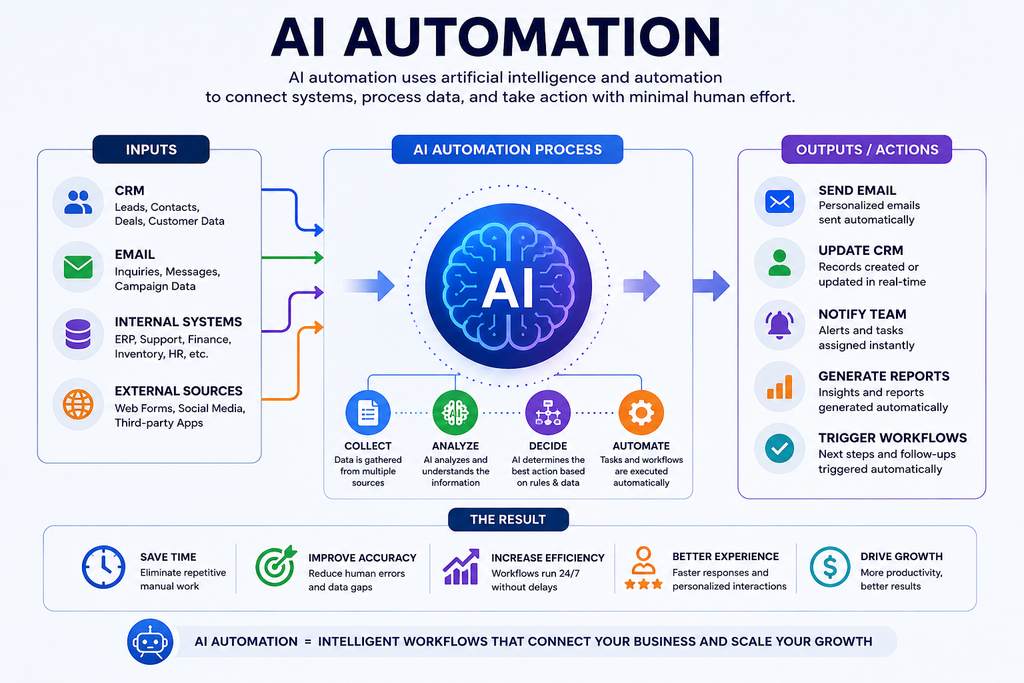
For example, when a new customer fills out a website form, an automated system could:
- Create the customer in the CRM.
- Analyze the customer’s information.
- Send a personalized email.
- Notify the appropriate sales representative.
- Create a follow-up task.
- Update the customer’s status automatically.
Instead of employees moving information between several systems, the systems communicate with one another.
How AI Connects Your CRM, Email & Internal Systems
The connection usually happens through APIs, webhooks, integration platforms, or custom software.
1. Connect Your CRM
Your CRM contains valuable customer information such as names, contact details, leads, deals, communication history, and customer status.
Modern CRM platforms provide APIs that allow external applications to read, create, update, and synchronize records. For example, HubSpot’s CRM API documentation explains how CRM objects, records, properties, and associations can be managed and connected with other systems.
2. Connect Email
Email becomes more powerful when it can respond to information from your CRM.
For example:
New lead → CRM update → AI analyzes lead → personalized email → sales notification
Microsoft Graph, for example, allows applications with the appropriate permissions to access Outlook mail data and automate email-related operations.
This means businesses can build workflows where emails are triggered by specific customer actions rather than relying entirely on employees to send them manually.
3. Connect Internal Systems
Your CRM and email are only part of the business ecosystem. AI automation can also connect systems such as:
- Accounting software
- Inventory platforms
- Customer support systems
- HR tools
- Project management software
- Databases
- Internal dashboards
- Document management systems
For example, a completed sale could automatically update the CRM, notify the finance team, generate an internal task, and trigger a customer confirmation email.
A Simple AI Automation Workflow
Imagine a customer sends an inquiry through your website.
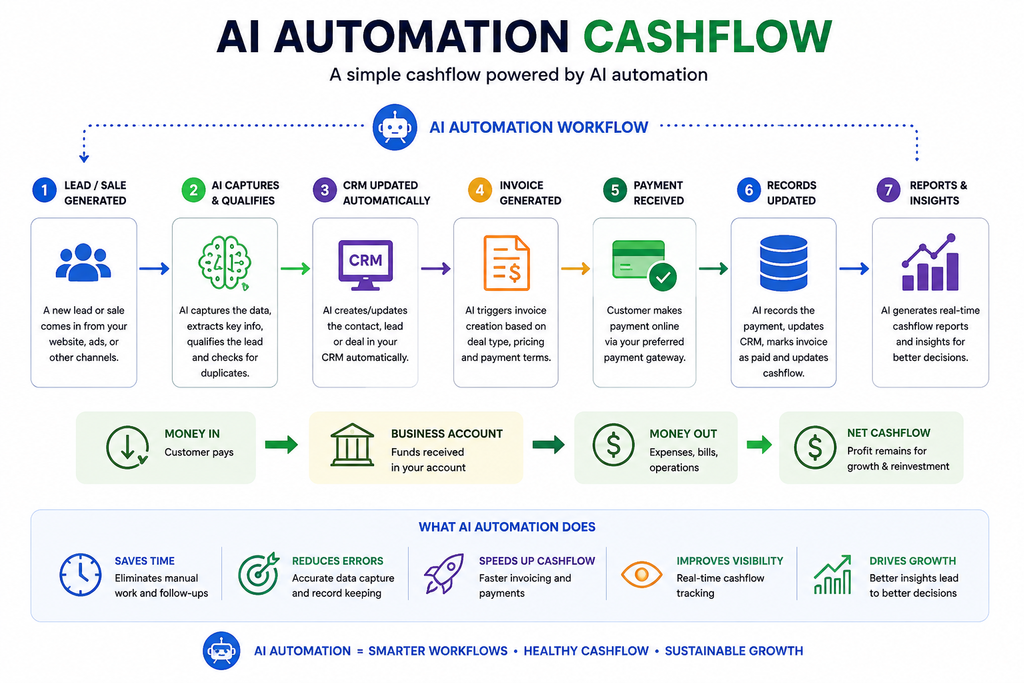
Customer inquiry → AI analyzes request → CRM creates/updates contact → AI categorizes lead → Email is personalized → Sales team is notified → Follow-up is scheduled
This is where AI automation becomes more than simple task automation.
Traditional automation generally follows fixed rules. AI can add capabilities such as classification, summarization, natural-language understanding, prediction, and content generation.
Why Connect Your Business Systems?
When systems operate separately, employees often become the “bridge” between them.
That creates repetitive work and increases the possibility of errors.
Connecting systems through AI automation can help businesses:
Reduce Manual Work
Employees spend less time copying information from one platform to another.
Improve Data Accuracy
Information can be synchronized automatically, reducing duplicate or outdated records.
Respond Faster
AI-powered workflows can react to customer activity immediately instead of waiting for someone to process it manually.
Improve Customer Experience
Customers can receive faster, more relevant communication because the system has access to useful context.
Give Teams Better Visibility
When important information is connected, employees can see a clearer picture of customer activity and business operations.
AI Automation vs Traditional Automation
There is an important difference.
Traditional automation:
“If X happens, do Y.”
AI automation:
“If X happens, understand the information, determine what it means, and perform the appropriate action.”
For example, traditional automation might send the same email whenever a form is submitted. AI automation could analyze the inquiry, identify the customer’s intent, and help generate a more relevant response.
However, AI should not be given unlimited control over important business processes. Sensitive actions should include permissions, validation, monitoring, and human oversight.
What Businesses Should Automate First
The best starting point isn’t necessarily the most complicated process.
Look for tasks that are:
- Repetitive
- Time-consuming
- Rule-based
- High-volume
- Prone to manual errors
- Spread across multiple systems
A good first workflow might be lead capture → CRM update → email response → team notification → follow-up task.
Once that workflow is reliable, businesses can gradually automate more complex processes.
The Bottom Line
AI automation is about connecting your business, not simply adding AI to it.
When your CRM, email, and internal systems can communicate effectively, information moves faster and employees can spend less time performing repetitive administrative tasks.
The real value comes from designing intelligent workflows that combine AI + integrations + business rules + human oversight.
Start with one repetitive process, connect the systems involved, measure the results, and improve from there. That is how businesses can turn AI automation from an interesting technology into a practical competitive advantage
visit our store to explore our trading solutions